Introduction
The fsm library is a popular Go library with 3,302 stars on GitHub, designed to provide a simple and efficient way to implement finite state machines in Go applications. Finite state machines are a fundamental concept in computer science, allowing developers to model complex systems and behaviors in a structured and maintainable way. The fsm library provides a lightweight and easy-to-use API for defining and interacting with finite state machines, making it an attractive choice for developers looking to add state machine functionality to their Go applications.
Developers should care about this library because it provides a simple and efficient way to implement complex state machine logic, which is essential in many real-world applications, such as workflow management, protocol implementation, and game development. The library’s small footprint and low overhead make it suitable for use in a wide range of applications, from small command-line tools to large-scale distributed systems.
Key Features
The fsm library provides several key features that make it an attractive choice for developers:
- Simple and intuitive API: The library provides a simple and easy-to-use API for defining and interacting with finite state machines.
- Support for multiple state machine types: The library supports multiple state machine types, including Mealy machines and Moore machines.
- Transition guards: The library provides support for transition guards, which allow developers to specify conditions under which transitions can occur.
- Event handling: The library provides support for event handling, which allows developers to trigger state machine transitions based on external events.
- Error handling: The library provides robust error handling mechanisms, which allow developers to handle errors and exceptions in a structured and maintainable way.
- Support for concurrent execution: The library provides support for concurrent execution, which allows developers to execute state machines in parallel.
- Extensive testing: The library provides an extensive test suite, which ensures that the library is reliable and stable.
Installation and Setup
To install the fsm library, use the following command:
1go get -u github.com/looplab/fsm
The library requires Go 1.13 or later to run. To verify the installation, you can use the following simple test:
 1package main
 2
 3import (
 4	"context"
 5	"fmt"
 6	"github.com/looplab/fsm"
 7)
 8
 9func main() {
10	fsm := fsm.NewFSM(
11		"start",
12		fsm.Events{
13			{"RUN", "start", "running"},
14			{"STOP", "running", "start"},
15		},
16		fsm.Callbacks{},
17	)
18	fmt.Println(fsm.Current())
19}
This code creates a simple state machine with two states and two transitions, and prints the current state to the console.
Basic Usage
Here is a minimal “Hello World” example that demonstrates the basic usage of the fsm library:
 1package main
 2
 3import (
 4	"fmt"
 5	"github.com/looplab/fsm"
 6)
 7
 8func main() {
 9	fsm := fsm.NewFSM(
10		"start",
11		fsm.Events{
12			{"RUN", "start", "running"},
13		},
14		fsm.Callbacks{},
15	)
16	fmt.Println(fsm.Current()) // Output: start
17	fsm.Event("RUN")
18	fmt.Println(fsm.Current()) // Output: running
19}
This code creates a simple state machine with one state and one transition, and prints the current state to the console before and after triggering the transition.
Real-World Examples
Here are a few complex, production-ready code examples that demonstrate real-world usage of the fsm library:
Example 1: Workflow Management
 1package main
 2
 3import (
 4	"fmt"
 5	"github.com/looplab/fsm"
 6)
 7
 8type Workflow struct {
 9	fsm *fsm.FSM
10}
11
12func NewWorkflow() *Workflow {
13	fsm := fsm.NewFSM(
14		"pending",
15		fsm.Events{
16			{"APPROVE", "pending", "approved"},
17			{"REJECT", "pending", "rejected"},
18			{"START", "approved", "in_progress"},
19			{"FINISH", "in_progress", "completed"},
20		},
21		fsm.Callbacks{},
22	)
23	return &Workflow{fsm: fsm}
24}
25
26func (w *Workflow) Approve() {
27	w.fsm.Event("APPROVE")
28}
29
30func (w *Workflow) Reject() {
31	w.fsm.Event("REJECT")
32}
33
34func (w *Workflow) Start() {
35	w.fsm.Event("START")
36}
37
38func (w *Workflow) Finish() {
39	w.fsm.Event("FINISH")
40}
41
42func main() {
43	workflow := NewWorkflow()
44	fmt.Println(workflow.fsm.Current()) // Output: pending
45	workflow.Approve()
46	fmt.Println(workflow.fsm.Current()) // Output: approved
47	workflow.Start()
48	fmt.Println(workflow.fsm.Current()) // Output: in_progress
49	workflow.Finish()
50	fmt.Println(workflow.fsm.Current()) // Output: completed
51}
This code defines a Workflow struct that uses the fsm library to manage a workflow with multiple states and transitions.
Example 2: Document Review Workflow
 1package main
 2
 3import (
 4	"fmt"
 5	"github.com/looplab/fsm"
 6)
 7
 8type Document struct {
 9	fsm *fsm.FSM
10}
11
12func NewDocument() *Document {
13	fsm := fsm.NewFSM(
14		"draft",
15		fsm.Events{
16			{"EDIT", "draft", "draft"},
17			{"BEGIN_REVIEW", "draft", "review"},
18			{"REQUEST_CHANGES", "review", "change_requested"},
19			{"REJECT_CHANGES", "change_requested", "review"},
20			{"ACCEPT_CHANGES", "change_requested", "draft"},
21			{"SUBMIT", "review", "submitted_to_client"},
22			{"DECLINE", "submitted_to_client", "declined"},
23			{"RESTART_REVIEW", "declined", "review"},
24			{"APPROVE", "submitted_to_client", "approved"},
25		},
26		fsm.Callbacks{
27			"before_event": func(ctx context.Context, e *fsm.Event) {
28				fmt.Printf("before: %s (%s -> %s)\n", e.Event, e.Src, e.Dst)
29			},
30			"after_event": func(ctx context.Context, e *fsm.Event) {
31				fmt.Printf("after: %s (%s)\n", e.Event, e.Dst)
32			},
33			"enter_state": func(ctx context.Context, e *fsm.Event) {
34				fmt.Printf("enter: %s\n", e.Dst)
35			},
36			"leave_state": func(ctx context.Context, e *fsm.Event) {
37				fmt.Printf("leave: %s\n", e.Src)
38			},
39			"after_BEGIN_REVIEW": func(ctx context.Context, e *fsm.Event) {
40				fmt.Println("action: reviewer assigned")
41			},
42			"after_REQUEST_CHANGES": func(ctx context.Context, e *fsm.Event) {
43				fmt.Println("action: notify author for updates")
44			},
45			"after_SUBMIT": func(ctx context.Context, e *fsm.Event) {
46				fmt.Println("action: send to client")
47			},
48			"after_DECLINE": func(ctx context.Context, e *fsm.Event) {
49				fmt.Println("action: log client feedback")
50			},
51			"after_APPROVE": func(ctx context.Context, e *fsm.Event) {
52				fmt.Println("action: archive approved document")
53			},
54		},
55	)
56	return &Document{fsm: fsm}
57}
58
59func main() {
60	doc := NewDocument()
61	fmt.Println(doc.fsm.Current()) // Output: draft
62	doc.fsm.Event("BEGIN_REVIEW")
63	fmt.Println(doc.fsm.Current()) // Output: review
64	doc.fsm.Event("REQUEST_CHANGES")
65	fmt.Println(doc.fsm.Current()) // Output: change_requested
66	doc.fsm.Event("REJECT_CHANGES")
67	fmt.Println(doc.fsm.Current()) // Output: review
68	doc.fsm.Event("SUBMIT")
69	fmt.Println(doc.fsm.Current()) // Output: submitted_to_client
70	doc.fsm.Event("DECLINE")
71	fmt.Println(doc.fsm.Current()) // Output: declined
72	doc.fsm.Event("RESTART_REVIEW")
73	fmt.Println(doc.fsm.Current()) // Output: review
74	doc.fsm.Event("SUBMIT")
75	fmt.Println(doc.fsm.Current()) // Output: submitted_to_client
76	doc.fsm.Event("APPROVE")
77	fmt.Println(doc.fsm.Current()) // Output: approved
78}
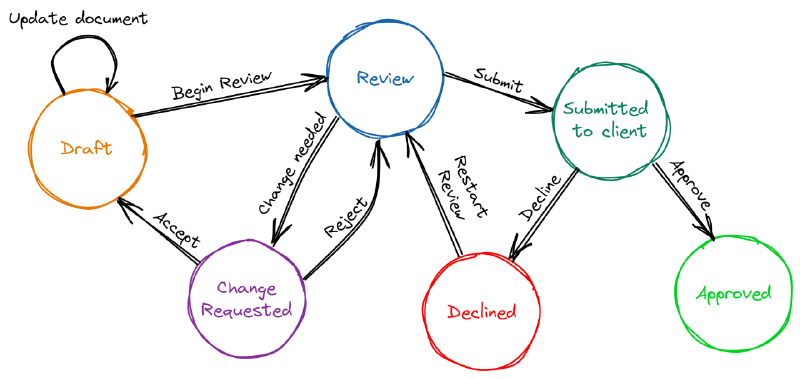
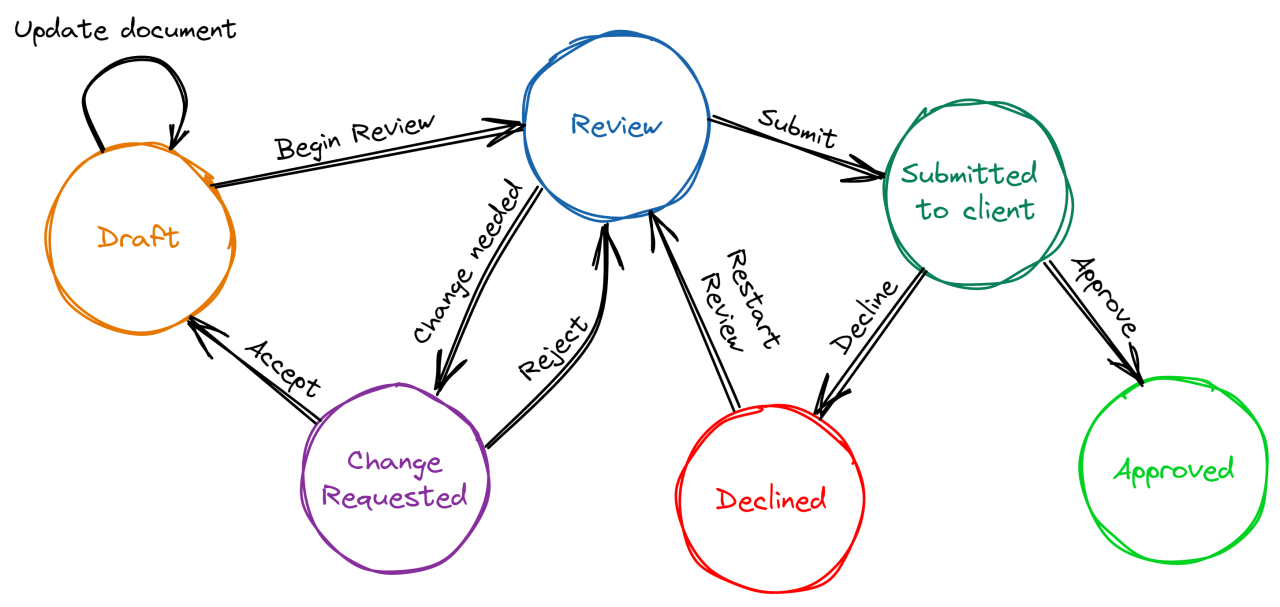
This code defines a Document struct that uses the fsm library to model a document review workflow with the same states and transitions shown in the diagram. Each transition runs callback functions so you can see and extend the workflow behavior:
- Global callbacks (
before_event,after_event,enter_state,leave_state) run for every transition. These are helpful for logging, auditing, or enforcing cross-cutting rules. - Event-specific callbacks like
after_BEGIN_REVIEWorafter_SUBMITrun only for that transition. This is where you place business actions such as assigning reviewers or notifying clients.
In practice, you can replace the fmt.Println lines with real application logic (e.g., sending notifications, persisting status, or triggering background jobs).
Example output (abridged):
 1draft
 2before: BEGIN_REVIEW (draft -> review)
 3leave: draft
 4enter: review
 5after: BEGIN_REVIEW (review)
 6action: reviewer assigned
 7review
 8before: REQUEST_CHANGES (review -> change_requested)
 9leave: review
10enter: change_requested
11after: REQUEST_CHANGES (change_requested)
12action: notify author for updates
13change_requested
14before: REJECT_CHANGES (change_requested -> review)
15leave: change_requested
16enter: review
17after: REJECT_CHANGES (review)
18review
19before: SUBMIT (review -> submitted_to_client)
20leave: review
21enter: submitted_to_client
22after: SUBMIT (submitted_to_client)
23action: send to client
24submitted_to_client
25before: DECLINE (submitted_to_client -> declined)
26leave: submitted_to_client
27enter: declined
28after: DECLINE (declined)
29action: log client feedback
30declined
31before: RESTART_REVIEW (declined -> review)
32leave: declined
33enter: review
34after: RESTART_REVIEW (review)
35review
36before: SUBMIT (review -> submitted_to_client)
37leave: review
38enter: submitted_to_client
39after: SUBMIT (submitted_to_client)
40action: send to client
41submitted_to_client
42before: APPROVE (submitted_to_client -> approved)
43leave: submitted_to_client
44enter: approved
45after: APPROVE (approved)
46action: archive approved document
47approved
Best Practices and Common Pitfalls
Here are a few best practices and common pitfalls to keep in mind when using the fsm library:
- Keep your state machine simple: Avoid creating complex state machines with many states and transitions. Instead, break down your state machine into smaller, more manageable pieces.
- Use transition guards: Transition guards can help prevent invalid transitions and ensure that your state machine is in a consistent state.
- Handle errors properly: Make sure to handle errors properly and provide meaningful error messages to help with debugging.
- Test your state machine thoroughly: Test your state machine thoroughly to ensure that it is working as expected.
- Avoid using the
fsmlibrary for complex business logic: Thefsmlibrary is designed for simple state machine logic, not complex business logic. Avoid using it for complex business logic, and instead use a more suitable library or framework.
Conclusion
The fsm library is a simple and efficient way to implement finite state machines in Go applications. It provides a lightweight and easy-to-use API, support for multiple state machine types, transition guards, event handling, and error handling. The library is suitable for use in a wide range of applications, from small command-line tools to large-scale distributed systems. By following best practices and avoiding common pitfalls, developers can use the fsm library to create robust and maintainable state machines that meet their needs. For more information, please visit the fsm library GitHub page.